
Why Mobile Data Drains Fast in Ghana (5 Hidden Causes and Solutions)

Table of Contents
- What Causes Mobile Data to Drain Fast in Ghana?
- Hidden Cause 1: Adaptive Bitrate Streaming and Background Video Prefetching
- Hidden Cause 2: Unrestricted WhatsApp Media and Status Auto-Downloads
- Hidden Cause 3: High-Resolution Cloud Synchronization and Silent Telemetry
- Hidden Cause 4: Laptop Personal Hotspot Exploitation (Windows Update Leakage)
- Hidden Cause 5: Predatory Bundle Expirations and Out-of-Bundle Airtime Siphoning
- Technical Data Burn Comparison: Standard versus Constrained Settings
- Action Plan: Stop Data Drainage on Your Phone Today
Mobile data in Ghana drains rapidly because modern smartphone operating systems and social applications prioritize high-speed media delivery over consumer data conservation. The primary technical drivers of rapid data loss are background video prefetching, adaptive bitrate escalation on 4G LTE connections, automated cloud photo synchronization, unthrottled laptop background updates through mobile hotspots, and predatory bundle expiration timers enforced by legacy network operators. When mobile data connects to high-speed cellular masts, applications assume an unlimited broadband pipeline and download heavy payloads without explicit user permission.
When your money is on the line, leaving application settings on default is equivalent to handing your wallet over to software developers and telecom algorithms. Taking control of your data consumption requires identifying exactly where megabytes leak silently and applying strict hardware-level and application-level barriers.
What Causes Mobile Data to Drain Fast in Ghana?
Smartphone data loss is rarely caused by simple text messaging or web reading. The loss stems from automated background processes engineered to consume maximum bandwidth whenever a stable 4G or 5G connection is detected. In Ghana, where cellular coverage across MTN, Telecel, and AirtelTigo delivers substantial throughput in urban hubs like Accra, Kumasi, and Takoradi, applications automatically request maximum file sizes.
The five hidden mechanisms responsible for over eighty percent of unexpected data drain are:
- Adaptive Bitrate Escalation: Video platforms secretly switch playback from standard definition to Full HD 1080p and pre-buffer upcoming clips before you scroll to them.
- Automated WhatsApp Group Media Downloads: Voice notes, forwarded videos, and high-resolution images download straight into device memory without your consent.
- Continuous Cloud Synchronization: Google Photos, Apple iCloud, and OneDrive upload full-resolution camera captures and device backups across mobile data.
- Laptop Personal Hotspot Exploitation: Windows Update and background software treat your phone mobile hotspot as an unlimited home fiber line.
- Predatory Bundle Expiration Deadlines: Time-limited daily and weekly bundles confiscate your unused gigabytes and expose your core airtime credit to out-of-bundle tariffs.
Hidden Cause 1: Adaptive Bitrate Streaming and Background Video Prefetching
The primary consumer of mobile data in Ghana is short-form video streaming across TikTok, Instagram Reels, YouTube Shorts, and Facebook Watch.
When you open TikTok or Instagram, the application does not simply fetch the video currently playing on your screen. The software algorithm automatically downloads the next three to five upcoming videos in high definition into your device memory cache. If you swipe past a video after watching only two seconds, the full twenty-megabyte payload has already been downloaded and billed to your data balance.
Furthermore, these applications operate on adaptive bitrate protocols. When your smartphone has a strong 4G LTE signal, the application automatically pushes resolution to 1080p at sixty frames per second. At this resolution, scrolling through video feeds burns through 700 MB to 1.1 GB of data in one hour.
The Technical Solution
You must manually restrict resolution ceilings inside each entertainment application:
- Inside TikTok: Navigate to Profile, tap Settings and Privacy, select Cache and Cellular, tap Data Saver, and toggle the switch to On. This cuts off background video prefetching and restricts playback resolution to standard definition on cellular connections, reducing data burn by approximately forty-five percent.
- Inside YouTube: Open Settings, tap Video Quality Preferences, and switch both Video quality on mobile networks and Video quality on Wi-Fi to Data Saver (360p to 480p). Disable Video Autoplay in settings so videos do not stream continuously when you fall asleep.
- Inside Instagram and Facebook: Open Settings, navigate to Media or Cellular Data Usage, and select Data Saver. Ensure you select Never under Autoplay Videos over Cellular Data.
Hidden Cause 2: Unrestricted WhatsApp Media and Status Auto-Downloads
WhatsApp is the backbone of daily communication, business, and social coordination in Ghana. However, active WhatsApp accounts are massive data sinks when left on default factory settings.
The typical Ghanaian smartphone user belongs to multiple active group chats, including family platforms, church groups, university alumni groups, and community forums. In these groups, members circulate high-definition greeting videos, voice notes, comedy clips, and multi-megabyte images throughout the day.
When media auto-download remains active, your phone automatically downloads every single file sent to every group you belong to, even if you never open the chat. A user belonging to five busy groups will unknowingly burn through 400 MB to 1.2 GB of cellular data daily on junk media. Furthermore, viewing WhatsApp Status updates downloads high-resolution photos and thirty-second video snippets directly over your data line.
The Technical Solution
Enforce an immediate cellular lockdown within WhatsApp:
- Open WhatsApp, navigate to Settings, and tap Storage and Data.
- Under the section labeled Media Auto-Download, select When Using Cellular Data.
- Uncheck every single box: Photos, Audio, Videos, and Documents.
- Under network calls, toggle Use Less Data for Calls to On. This optimizes voice call compression protocols and lowers data usage during WhatsApp audio calls from 40 MB per hour down to approximately 15 MB per hour.
With these controls active, media files will display a download arrow with the exact file size. You decide whether a file deserves your mobile data before a single kilobyte is spent.
Hidden Cause 3: High-Resolution Cloud Synchronization and Silent Telemetry
Modern smartphones feature sophisticated camera sensors capturing twelve to forty-eight megapixel photographs and 4K video clips. A single photo can weigh eight megabytes, while a one-minute 4K video can exceed three hundred megabytes.
Both Android devices through Google Photos and Apple devices through iCloud are configured by default to protect your memories by uploading every captured media asset to cloud storage. If cellular backup is enabled, your phone will begin uploading large raw video files immediately after you record them, even while standing on a mobile cellular connection.
Simultaneously, operating system telemetry and Background App Refresh permit applications such as food delivery trackers, ride-hailing platforms, and shopping apps to wake up your cellular modem every few minutes to fetch irrelevant notifications and transmit location analytics.
The Technical Solution
Separate your local camera storage from cellular transmission:
- For Android Users: Open the Google Photos app, tap your profile avatar, select Photos Settings, choose Backup, and tap Mobile data usage. Set Daily limit for backup to No data. Photos and recorded videos will wait until you connect to a verified Wi-Fi connection before uploading.
- For iPhone Users: Open iOS Settings, navigate to Photos, select Cellular Data, and toggle Cellular Data to Off. Next, open General, select Background App Refresh, and switch the global toggle to Off or restrict it exclusively to essential security apps.
Hidden Cause 4: Laptop Personal Hotspot Exploitation (Windows Update Leakage)
Sharing a mobile hotspot from a smartphone to a laptop is standard practice for students, remote workers, and entrepreneurs across Ghana. It is also one of the fastest ways to lose several gigabytes in under thirty minutes.
When a Windows laptop connects to your phone personal hotspot, the operating system registers the hotspot as a standard Wi-Fi connection. Desktop operating systems assume Wi-Fi networks have unlimited broadband capacity.
Consequently, the moment the connection establishes, Windows Update begins downloading pending cumulative software patches, Windows Defender definition updates, Edge browser component updates, and OneDrive cloud synchronization tasks in the background. A single Windows cumulative security patch averages between 1.5 GB and 3.5 GB. The laptop user will simply be browsing an email inbox while their entire 5GB phone bundle is completely consumed by background operating system tasks.
The Technical Solution
You must instruct your laptop operating system to treat the smartphone hotspot as a strictly metered cellular line:
- Connect your Windows laptop to your phone personal hotspot.
- Open Windows Settings, select Network and Internet, and click Wi-Fi.
- Click on the name of your connected phone hotspot network.
- Scroll down to Metered connection and toggle Set as metered connection to On.
- Open Windows Update settings and ensure the option labeled Download updates over metered connections is toggled Off.
Setting the connection to metered immediately halts automated Windows updates, pauses OneDrive background sync, and prevents applications from downloading non-essential patches while you work.
Hidden Cause 5: Predatory Bundle Expirations and Out-of-Bundle Airtime Siphoning
Not all data loss is caused by phone software. A substantial portion of lost data in Ghana is directly attributable to the commercial billing structures of traditional telecommunications providers.
Standard telecom offerings force subscribers into artificial expiration cycles: twenty-four-hour daily passes, three-day bundles, or seven-day allocations. If you purchase a 10GB weekly bundle for your studies or business and utilize only 6GB before Sunday midnight, the telecom system confiscates the remaining 4GB. You paid full monetary value for ten gigabytes, but forty percent of your purchase was seized simply because an arbitrary clock ran down.
Even worse is out-of-bundle browsing. The moment your bundle hits zero, legacy network systems quietly switch your connection to pay-as-you-go airtime billing without interrupting your internet session. In Ghana, standard pay-as-you-go tariffs can charge up to GHC 0.15 per megabyte. At that punitive rate, a basic GHC 20 airtime balance is drained in less than three minutes by silent background device traffic.
The Technical Solution
Protect your airtime balance and switch to non-expiring data assets:
- Deactivate Out-of-Bundle Browsing: On MTN, dial *138#, navigate to the data settings menu, and ensure out-of-bundle browsing is disabled so the internet halts immediately when your bundle reaches zero rather than siphoning your airtime. Telecel and AirtelTigo offer similar data-saver prompts within their account management USSD menus.
- Stop Buying Short-Expiry Bundles: Move your monthly data allocation completely to EliteDataGh Non-Expiry Data Bundles. Because EliteDataGh non-expiry bundles carry zero expiration deadlines, every single megabyte you pay for stays safely in your balance until you deliberately use it, whether that takes two weeks, two months, or six months.
Technical Data Burn Comparison: Standard versus Constrained Settings
The following comparison illustrates the measurable difference in data consumption between factory default application configurations and properly constrained telecom settings on 4G LTE networks in Ghana:
| Online Activity | Factory Default Consumption (Unrestricted 4G) | Optimized Consumption (Enforced Constraints) | Data Saved Per Hour |
|---|---|---|---|
| TikTok and Instagram Reels | 850 MB to 1,100 MB per hour | 350 MB to 450 MB per hour | ~650 MB / hr |
| YouTube Video Streaming | 1,200 MB to 2,000 MB per hour (1080p) | 350 MB to 450 MB per hour (480p) | ~1,150 MB / hr |
| WhatsApp Group Media | 400 MB to 1,200 MB per day (Auto-Download) | 30 MB to 60 MB per day (Manual Only) | ~700 MB / day |
| WhatsApp Voice and Video Calls | 350 MB per hour (High Bitrate Video) | 120 MB per hour (Low Data Mode) | ~230 MB / hr |
| Laptop Hotspot Browsing | 2,000 MB to 4,000 MB per session (Updates Active) | 150 MB to 300 MB per session (Metered Mode) | ~2,500 MB / session |
Implementing these technical adjustments transforms a 10GB bundle that previously vanished in five days into a resilient allocation that comfortably powers your daily professional and personal operations for three to four weeks.
Action Plan: Stop Data Drainage on Your Phone Today
Take five minutes right now to execute this protective checklist on your smartphone:
- Activate System Data Saver: Go to phone Settings, tap Network and Internet, open Data Saver, and toggle it On. This establishes an operating system rule preventing background apps from communicating over cellular data.
- Lock Down WhatsApp Storage: Open WhatsApp Settings, go to Storage and Data, and uncheck all four media categories under Cellular Data download.
- Turn Off Video Autoplay: Open TikTok, Instagram, Facebook, and YouTube settings to toggle in-app Data Saver options On and disable automatic video playback.
- Halt Cloud Cellular Backup: Open Google Photos or iCloud and disable cellular data backup for camera rolls and video recordings.
- Set Laptop Hotspot to Metered: The next time you share mobile internet with your computer, immediately flag the Wi-Fi profile as a Metered Connection in Windows network settings.
- Protect Your Balance with Non-Expiry Bundles: Avoid purchasing daily or weekly time-limited bundles that punish you for not finishing your data. Procure your MTN, Telecel, and AirtelTigo packages directly through EliteDataGh so every single gigabyte remains yours indefinitely.
By closing these hidden leaks and securing your data supply through non-expiry packages, you take absolute control of your digital budget and ensure that every pesewa you spend delivers full, uninterrupted connectivity.
Keep Reading

Best Site to Buy Cheap Data Online in Ghana (2026 Price & Delivery Comparison)
Compare the best site to buy cheap non-expiry data online in Ghana. View 2026 GHC per-GB rates across MTN, Telecel, and AT, with instant MoMo delivery.
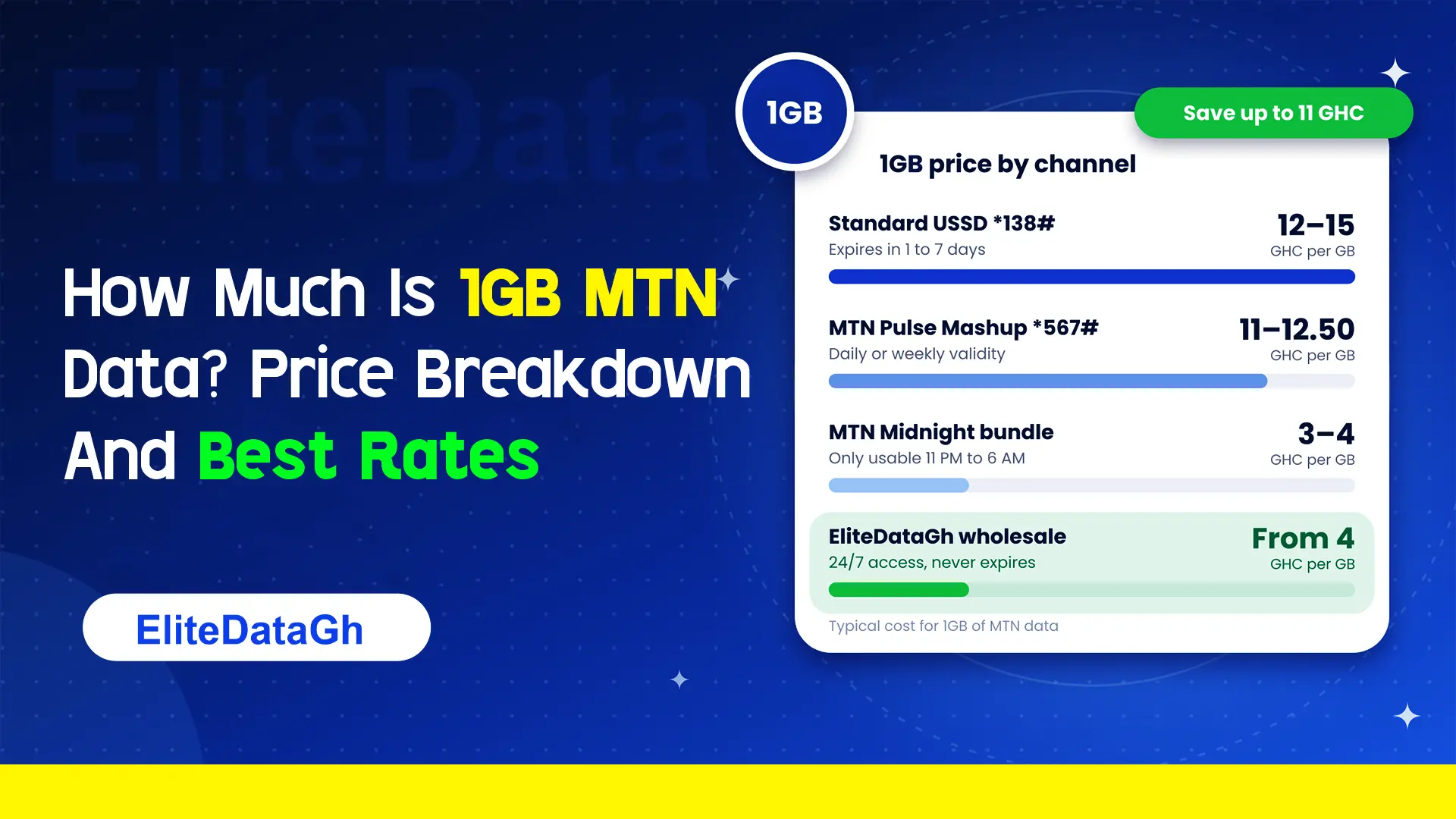
How Much Is 1GB MTN Data? Price Breakdown And Best Rates
Comparing the exact cost of 1GB MTN data across retail USSD, Pulse Mashup, midnight plans, and wholesale non-expiry rates starting from 4 GHC.
What Are 6 Hidden MTN Codes?
Uncover 6 critical hidden MTN codes to stop unauthorized airtime deductions, audit SIM registration, claim forgotten reward points, and verify network discounts.
What Does *138# Do On MTN?
Dialing *138# connects you to the master MTN internet and data bundle management portal. Learn how to navigate menus, check balances, and avoid retail markup traps.
Is There An MTN Free 1GB Data Code For 2026?
Exposing viral MTN free 1GB data codes in 2026. Discover how deceptive shortcodes drain airtime, legitimate operator bonus methods, and secure wholesale alternatives from 4 GHC.
Why Your MTNUP2U Data Order Gets Delayed Sometimes
A breakdown of the network validations and server bottlenecks that occasionally slow down your MTNUP2U data bundle delivery.
Why Your Order Got Rejected And What You Should Do
A direct technical explanation from a telecom provider on why MTN data bundle orders face rejection and the exact steps to claim your automatic wallet refund.