
How to Check Your SSNIT Number, Statements, and Pay Contributions via USSD (*711*9#)


Table of Contents
- What You Can Do on the SSNIT *711*9# Shortcode
- How to Check Your SSNIT Number and Ghana Card Merger Status
- How to Request Your SSNIT Contribution Statement via USSD
- How to Pay SSNIT Contributions Using Mobile Money (*711*9#)
- Alternative Ways to View Full Statements and Pay Online
- Troubleshooting Common *711*9# USSD Errors
- Frequently Asked Questions About SSNIT USSD (*711*9#)
You can check your SSNIT details, verify your contribution statement, merge your Ghana Card, and pay SSNIT contributions from any MTN, Telecel, or AT phone in Ghana by dialing *711*9#. After entering Member Services, supply your SSNIT Number, Ghana Card (NIA) Number, or Account Code, confirm your registered full name on screen, and select the service option you need without visiting a branch.
Whether you are a salaried employee tracking employer remittances, a self-employed contributor enrolled under the SEED initiative, or a worker who needs to confirm if your Ghana Card is linked to your pension profile, *711*9# keeps core SSNIT account tools accessible even on basic feature phones without internet access.
What You Can Do on the SSNIT 7119# Shortcode
Keep your Ghana Card or SSNIT Number nearby before dialing so your USSD session does not time out mid-menu. You can also bookmark *711*9# alongside essential Ghanaian service codes inside the Ghana USSD and Network Shortcodes Directory.
| Service Task | Supported ID Required | Delivery Channel | Best Use Case |
|---|---|---|---|
| Check SSNIT Number and Merger Status | Ghana Card (NIA) Number or SSNIT Number | Instant USSD screen confirmation | Verifying whether your Ghana Card and SSNIT records are merged |
| Merge Ghana Card with SSNIT | SSNIT Number and Ghana Card (NIA) Number | Real-time USSD linkage workflow | Connecting your national ID so your Ghana Card works as your SSNIT ID |
| Request Member Contribution Statement | SSNIT Number, Ghana Card, or Account Code | Sent to your registered SSNIT email address | Checking if monthly employer deductions are arriving cleanly |
| Pay Contributions via SSNITpay | SSNIT Number, Ghana Card, or Account Code | Mobile Money PIN approval prompt | Paying self-employed SEED or voluntary Tier 1 contributions |
How to Check Your SSNIT Number and Ghana Card Merger Status
Once SSNIT links your social security record with the National Identification Authority database, your Ghana Card Number can serve as your primary pension identifier alongside your older SSNIT number.
- Dial
*711*9#on MTN, Telecel, or AT. - Choose Member Services from the main prompt.
- Enter your Ghana Card (NIA) Number (formatted like
GHA-XXXXXXXXX-X) or your existing SSNIT Number when asked. - Review the Account Name displayed on your phone screen to verify that the profile belongs to you.
- Open the Merge Numbers or Merger Status option to confirm whether both IDs are already synchronized or follow the remaining prompts to submit the linkage request.
If your phone displays no email on file, shows an outdated name spelling, or fails to match your Ghana Card record, call the SSNIT Contact Centre on 0302 611 622 or 0308 048 611, message WhatsApp support on 0500 003 050, or visit any SSNIT branch with your physical Ghana Card.
How to Request Your SSNIT Contribution Statement via USSD
Checking your statement regularly helps employees spot missing employer deductions early before years pile up. Because itemized pension ledgers contain sensitive earnings history, USSD delivers statements to your registered email address rather than printing figures on a raw phone popup.
- Dial
*711*9#from your mobile line. - Select Member Services.
- Enter your SSNIT Number, Ghana Card Number, or Account Code and confirm your displayed account name.
- Select Member Statement from the sub-menu.
- Pick your preferred statement period or summary type and submit the request.
- Open your registered email inbox (and check your Spam or Promotions folder) within a few minutes to read your compiled SSNIT statement.
What to Look For Inside Your Statement
Check three key columns when your statement arrives:
- Employer Name and Contribution Period: Confirm every month you worked at your current and previous employers appears in sequence without unexplained gaps.
- Declared Basic Salary: Verify that the salary figure reported matches your payslip basic salary rather than a lower amount.
- Credited Tier 1 Amount: Under Ghana Act 766, formal employers remit 18.5% of basic salary toward pensions (13% employer plus 5.5% employee), from which 13.5% flows to the SSNIT Tier 1 Basic National Social Security Scheme and 5% goes to a private Tier 2 trustee.
How to Pay SSNIT Contributions Using Mobile Money (7119#)
Self-employed workers, traders, artisans, freelancers, and drivers registered under the Self-Employed Enrolment Drive (SEED) can pay regular Tier 1 pension contributions directly from Mobile Money through *711*9# and the SSNITpay channel powered by Ghana.GOV.
Before You Pay Self-Employed Contributions
- Enrol First if You Are New: New self-employed joiners aged 15 to 45 visit a SSNIT branch with their Ghana Card to activate a self-employed contribution profile, or existing formal-sector members continue payments using their declared income.
- Know the 13.5% Tier 1 Calculation: Self-employed members contribute 13.5% of their chosen declared monthly income. Note that SSNIT sets statutory minimum and maximum insurable earnings floors adjusted periodically with the National Daily Minimum Wage (for example, a baseline minimum monthly insurable earning floor of GHS 587.80 corresponds to a GHS 79.40 minimum monthly contribution).
- Prepare Wallet Balance: If you want to verify your total transaction cost before funding your MTN MoMo, Telecel Cash, or AT Money wallet for a large quarterly payment, check standard network wallet rates with our MoMo Charges Calculator.
Step-by-Step Mobile Money Contribution Steps
- Dial
*711*9#on your phone. - Navigate to the Payment or Pay Contributions workflow inside the USSD menu.
- Enter your SSNIT Number or Ghana Card Number and confirm your account name.
- Specify the Contribution Period and Payment Amount in Ghana Cedis.
- Choose Mobile Money and verify your wallet phone number.
- Wait for the MoMo approval popup on your screen, double-check the merchant name (SSNIT / Ghana.GOV), and enter your Mobile Money PIN to authorize the transfer.
- Keep the SMS confirmation receipt until your updated credit reflects on your SSNIT Member Statement.
Alternative Ways to View Full Statements and Pay Online
If you want to view itemized contribution tables directly on screen without waiting for an email PDF or prefer paying with a bank debit card, use either official online platform:
- SSNIT Member Portal (
portal.ssnit.org.gh): First-time users can click Sign Up / Request for Portal ID, enter their Ghana Card or SSNIT particulars, log in to view My Statement, download historical PDFs, and make online payments via SSNITpay. - SSNIT Mobile App: Available on Google Play Store, Apple App Store, and Huawei AppGallery for checking My Statement, viewing contributor details, and locating nearby branches.
Troubleshooting Common 7119# USSD Errors
Most USSD failures stem from session timeouts or unlinked contact details rather than closed accounts.
Statement Never Arrives in Your Email
If *711*9# confirms your statement request succeeded but nothing lands in your inbox after checking Spam, your SSNIT profile likely still holds an old work email, an inactive Gmail account, or a typo made during enrolment. Send a quick update query via WhatsApp on 0500 003 050, email contactcentre@ssnit.org.gh, or visit any branch with your Ghana Card to update your email record.
USSD Session Ends With Connection Problem or Invalid MMI
Shortcodes time out automatically if you pause for more than 20 to 30 seconds while searching for a card ID. Write your Ghana Card (GHA-...) or SSNIT Number down on paper first, dial *711*9# cleanly from an area with steady 3G or 4G bars, and confirm you are typing digits without accidental spaces.
Mobile Money Prompt Fails to Pop Up
When the contribution approval box does not appear after submitting payment details, check that your Mobile Money balance covers the amount and clear any queued requests in your MoMo approvals menu (*170# My Approvals on MTN) before dialing *711*9# again. Never pay a SSNIT contribution to an individual personal phone number.
Frequently Asked Questions About SSNIT USSD (7119#)
Can I dial 7119# on MTN, Telecel, and AT in Ghana?
Yes. The *711*9# shortcode works across MTN, Telecel, and AT mobile lines nationwide, including basic feature phones without mobile data.
Can I retrieve a forgotten SSNIT number using my Ghana Card?
Yes. Dial *711*9#, enter Member Services, and supply your Ghana Card (NIA) Number to verify your linked account details and merger status. If your old SSNIT number has not yet been merged with your Ghana Card, contact the SSNIT Contact Centre on 0302 611 622 or 0308 048 611 or visit a SSNIT branch with your Ghana Card.
Is there a separate Mobile Money contribution rate for self-employed members?
Self-employed workers enrolled under SEED contribute 13.5% of their declared monthly earnings toward Tier 1 pension coverage, subject to SSNIT statutory minimum and maximum insurable earnings thresholds updated alongside national wage adjustments.
Why does 7119# send my statement to email instead of showing every month on screen?
Full contribution statements list years of salary history and monthly deductions that exceed the character limit of USSD screens. Sending the statement to your registered email protects financial privacy and gives you a downloadable PDF record.
How can I contact SSNIT if my employer deductions are missing from my statement?
Keep copies of your monthly payslips and contact SSNIT via 0302 611 622, 0308 048 611, WhatsApp 0500 003 050, or contactcentre@ssnit.org.gh, or submit an official verification request at your nearest branch with your Ghana Card.
Keep Reading

Telecel One Family Plan Explained: How to Share Voice and Data Across Numbers
Telecel One Family explained: dial *900# or use Telecel Play to share broadband data and voice across 1 to 4 paired numbers on 30-day household plans cleanly.

How to Share or Transfer Airtime on Telecel Ghana Using *516#
Dial *516# on Telecel Ghana to share airtime credit to 020 and 050 numbers. Learn the express code, GHS 0.05 fee, default 1234 PIN setup, and transfer rules.

MTN Pulse and Mashup Bundles (*567#): Complete USSD Guide and Validity Rules
Dial *567# for MTN Pulse Mashup bundles in Ghana. Explore Voice and Data mix rules, social bonuses, non-expiry validity, and *567*4# balance checks cleanly.

MTN Ghana Data Zone (*138#) Explained: Why Offers Disappear and How to Qualify
Learn why MTN Ghana Data Zone (*135# and *138#) and Just4U (*141#) offers change, how NCA SMP rules affect pricing, and how your SIM qualifies for better data.

How to Cancel Unwanted Subscriptions and Caller Tunes Draining MTN Airtime
Cancel unwanted MTN Ghana subscriptions draining your airtime: dial *175# for VAS promos, *1355# or SMS Unsubscribe to 1355 for Caller Tunez, and STOP to 138.

Complete Guide to Ghana Emergency Shortcodes: Police (191), Fire (192), Ambulance (193), and 112
Dial 112 toll-free in Ghana for unified Police (191), Fire (192), and Ambulance (193) dispatch, plus verified NADMO, DOVVSU, ECG, and 292 cyber hotlines.
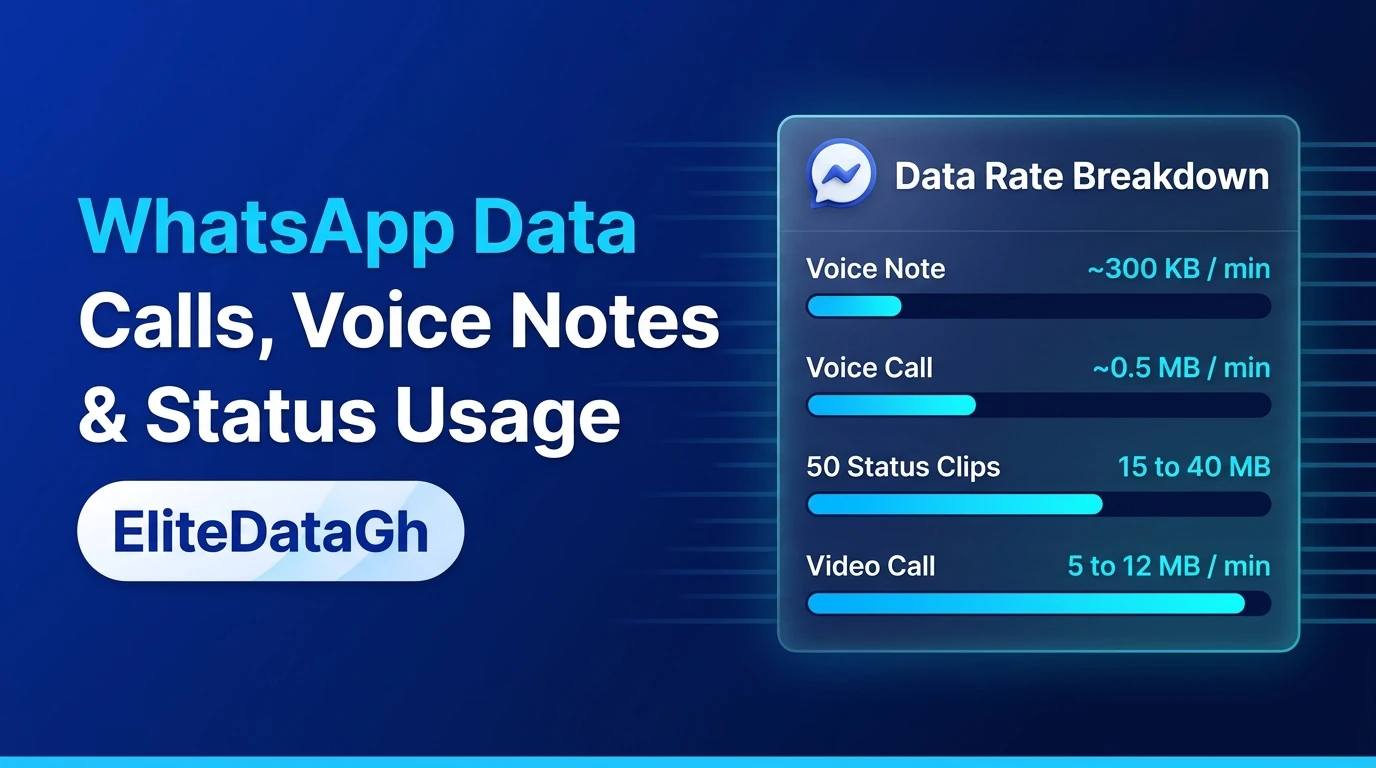
How Much Data Do WhatsApp Calls, Voice Notes, and Status Updates Actually Use?
Find out how much mobile data WhatsApp voice calls, video calls, voice notes, and Status updates consume in MB and GB per hour, plus 5 data-saving settings.