
What Internet Speed (Mbps) Do You Actually Need for TikTok, YouTube 1080p, and Zoom?

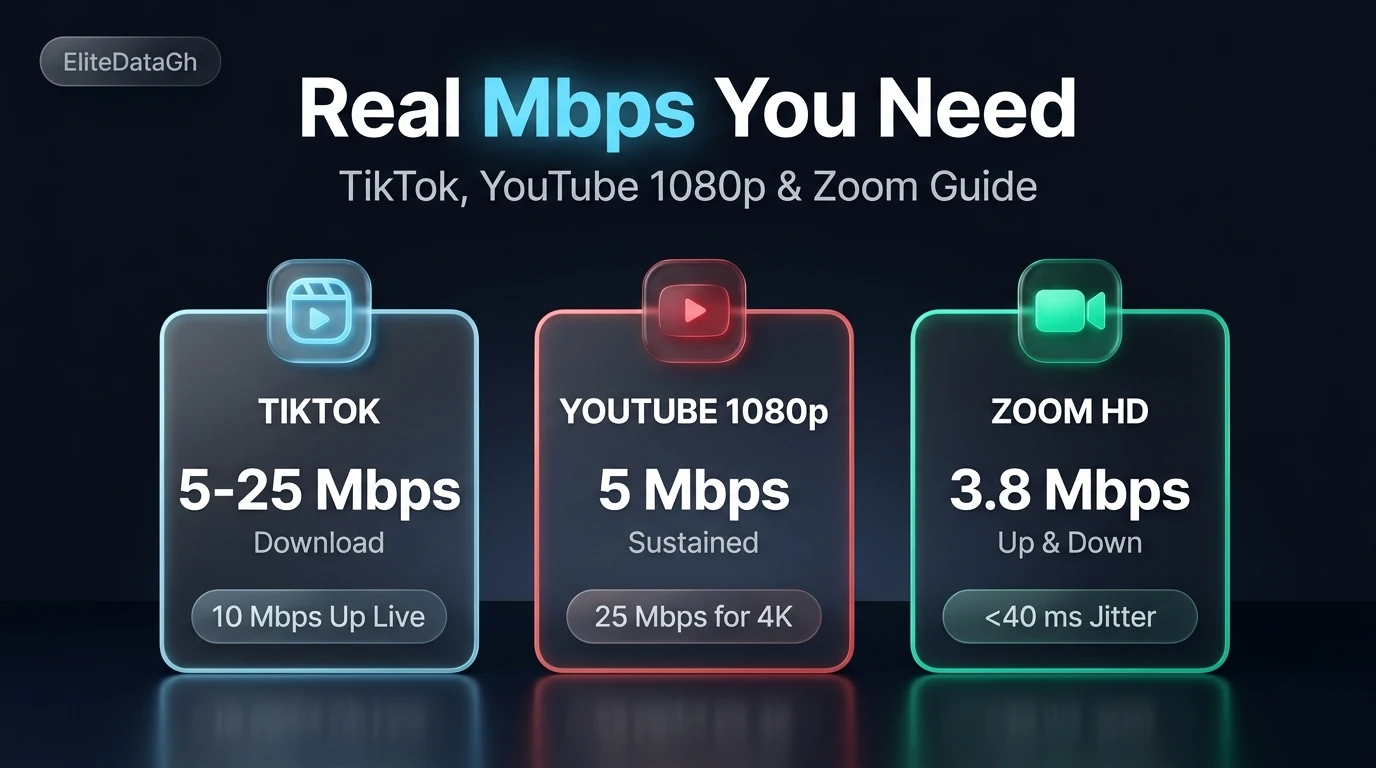
Table of Contents
For a single user, YouTube 1080p requires a steady 5 Mbps download speed, TikTok plays smoothly from 5 Mbps to 10 Mbps (rising to 10 Mbps to 25 Mbps for rapid zero-lag HD scrolling, or 5 Mbps to 10 Mbps upload if broadcasting TikTok Live), and Zoom HD video calls require 1.2 Mbps to 3.8 Mbps in both download and upload alongside low latency (under 150 ms, ideally under 85 ms), low jitter (under 40 ms), and packet loss below 2%.
Paying for a 50 Mbps or 100 Mbps plan will not save your Zoom meeting or stop TikTok stuttering if your upload speed, ping, or jitter collapses under poor cellular signal or router contention. Real-world streaming depends on sustained throughput stability rather than brief speed-test bursts.
Minimum vs Comfortable Mbps by Platform
Every video app uses distinct download, upload, and latency mechanics. Passive playback tolerates minor network spikes using video buffers, whereas two-way Zoom calls fail immediately when packets arrive late or out of sequence.
| Application and Quality Mode | Required Download Speed | Required Upload Speed | Ping and Jitter Limit | Practical Reality for Multiple Devices |
|---|---|---|---|---|
| YouTube 720p HD | 2.5 Mbps sustained | Under 0.5 Mbps | Under 120 ms ping | 10 Mbps handles 3 concurrent streams easily |
| YouTube 1080p Full HD | 5.0 Mbps sustained | Under 0.5 Mbps | Under 110 ms ping | Need 15+ Mbps if two people stream 1080p plus sync cloud apps |
| YouTube 4K Ultra HD | 20 Mbps to 25 Mbps | 1.0 Mbps | Under 80 ms ping | Two 4K TVs plus phones demand 50+ Mbps steady |
| TikTok Feed Scrolling (1080p) | 5 Mbps min (10 Mbps to 25 Mbps smooth) | 1.0 Mbps | Under 110 ms ping | Fast swiping pre-loads several clips ahead at once |
| TikTok Live Broadcast (1080p) | 5.0 Mbps | 7.5 Mbps to 10 Mbps steady | Under 90 ms ping, under 25 ms jitter | Stream ingest (4 to 8 Mbps) needs 30% extra upload headroom |
| Zoom 1:1 High Quality / 720p HD | 0.6 Mbps to 1.2 Mbps | 0.6 Mbps to 1.2 Mbps | Under 150 ms ping, under 40 ms jitter | Add 3+ Mbps headroom for background notifications |
| Zoom Group Calling (720p / 1080p HD) | 1.8 Mbps to 3.0+ Mbps (4 Mbps large gallery) | 2.6 Mbps to 3.8 Mbps | Under 85 ms ideal ping, under 30 ms jitter | Upload weakness freezes your outgoing webcam feed |
Notice the crucial rule across shared homes and offices: bandwidth stacks across every active user. If one family member streams YouTube 1080p (5 Mbps), another scrolls TikTok (5 to 10 Mbps), and a third laptop enters a Zoom group meeting (3.8 Mbps), your router needs at least 20 Mbps to 25 Mbps sustained download and 5+ Mbps steady upload to stop video freezes.
App-by-App Breakdown: TikTok, YouTube 1080p, and Zoom
1. YouTube 1080p (Official Google Sustained Bitrates)
Google official playback guidelines place YouTube 1080p Full HD at 5 Mbps sustained, down to 2.5 Mbps for 720p HD, 1.1 Mbps for 480p, and 0.7 Mbps for 360p, while 4K UHD climbs to 20 Mbps. The critical word here is sustained.
Mobile data connections inside concrete buildings regularly spike briefly to 18 Mbps for two seconds and dip down to 1.5 Mbps moments later due to cell tower crowding. Because YouTube pulls video segments in discrete buffered chunks, momentary dips below 5 Mbps force the player to drop resolution down to blurry 480p or spin a loading circle. Maintaining 10 Mbps consistent downstream headroom ensures uninterrupted 1080p playback even when phones pull background updates.
2. TikTok Scrolling vs TikTok Live Streaming
TikTok treats consumers and live creators completely differently:
- Watching and Fast Scrolling: Unlike YouTube, where you hit play on a single 15-minute video, fast TikTok swiping triggers aggressive pre-fetching of the next several high-bitrate vertical clips simultaneously. While
5 Mbpsruns normal compressed feeds cleanly,10 Mbps to 25 Mbpskeeps instant-swipe playback sharp at1080pwithout dark pauses between clips. - Broadcasting TikTok Live: Hosting live HD video flips network priority from download to upload bandwidth. A crisp
1080plive broadcast typically encodes between4 Mbps and 8 Mbpsbitrate, requiring roughly7.5 Mbps to 10 Mbpssteady upload speed so protocol overhead does not drop video frames or turn your stream blocky. On asymmetric4Gnetworks where upload sits around2 Mbps, dropping stream resolution down to720pprotects stream stability.
3. Zoom Calls (Why Upload, Ping, and Jitter Matter More Than Download)
According to Zoom technical specifications, standard high-quality 1:1 calls need just 0.6 Mbps up and down, 720p HD group meetings use 2.6 Mbps upload and 1.8 Mbps download, and 1080p HD meetings peak around 3.8 Mbps upload and 3.0 Mbps download (with up to 4.0 Mbps download for 49-tile gallery layouts). Even pure audio VoIP plus screen sharing needs barely 60 kbps to 150 kbps.
Why do users with 20 Mbps speed test scores still suffer frozen Zoom calls? Three silent killers break live meetings:
- Asymmetric Upload Starvation: Cellular LTE routers and lower fiber tiers frequently provide generous download capacity alongside narrow upload lanes. Once your upload drops below
2.5 Mbpsinside thick indoor walls, your voice clips and your camera freezes for colleagues. - High Ping Latency (Above
150 ms): Round-trip delay above150 mscreates painful conversational lag where participants accidentally talk over each other. Keeping ping below85 msmakes meetings feel natural. - High Jitter (Above
40 ms) and Packet Loss (Above2%): Jitter measures how erratically packets arrive millisecond by millisecond. Even if your average download speed equals30 Mbps, jitter jumping past40 msor packet loss rising past2%turns spoken sentences robotic and forces Zoom to display the unstable connection banner.
Why Mbps Speed Is Not Megabytes per Second (Divide by 8)
Many subscribers confuse Megabits per second (Mbps) with Megabytes (MB), assuming a 10 Mbps line downloads a 10 MB file in one second. One byte contains eight bits, meaning you must divide your internet speed in Mbps by 8 to calculate true file transfer speed in MB/s:
- At
5 Mbps: Maximum real download throughput equals0.625 MB/s(~37.5 MBper minute). YouTube1080pplays comfortably, yet a1 GB(1,024 MB) software update requires roughly27 minutes. - At
10 Mbps: Maximum throughput equals1.25 MB/s, downloading1 GBin roughly13.7 minutes. - At
25 Mbps: Maximum throughput equals3.125 MB/s, downloading1 GBin roughly5.5 minutes. - At
100 Mbps: Maximum throughput equals12.5 MB/s, pulling1 GBin roughly1 minute 22 seconds.
Remember that faster throughput lets apps fetch higher-bitrate 1080p streams cleanly, which consumes your monthly data allowance noticeably quicker. Estimate exact monthly gigabytes needed for your viewing resolution on our Data Usage Calculator and inspect exact binary unit conversions via our MB to GB Converter.
How to Diagnose Slow Calls When Your Download Speed Looks Fast
Before upgrading plans unnecessarily, run a full diagnostic measurement inside the exact room where you work or stream using our Ghana Internet Speed Test. Inspect Upload Mbps, Ping, and Jitter alongside Download Mbps, then fix the root bottleneck:
- Eliminate Router Bufferbloat During Calls: Pause large PlayStation downloads, Google Photos syncs, and Windows updates on other devices during live Zoom meetings; saturating upstream bandwidth spikes jitter past
100 msinstantly. - Choose the Right Wi-Fi Band: Connect to
5 GHzWi-Fi when sitting in the same room as your router for maximum throughput and minimal interference; switch to2.4 GHzonly when multiple concrete walls stand between your desk and the router. - Improve Cellular Placement Near Windows: For 4G LTE MiFi and router setups in concrete Ghanaian buildings, moving a router two meters onto a window ledge frequently doubles upstream
Mbpsand slashes ping jitter in half. - Cap Resolution When Traveling on Weak Signal: Locking YouTube down to
480por turning off incoming HD video inside Zoom settings stabilizes live meetings over1.5 Mbpsweak cellular links without disconnects.
Frequently Asked Questions About Internet Speeds for Video and Calls
Is 5 Mbps fast enough for YouTube 1080p and TikTok?
Yes, 5 Mbps sustained speed meets Google's official recommendation for smooth single-stream YouTube 1080p and standard TikTok viewing. However, if a second person uses the same Wi-Fi network or your cellular tower dips during peak hours, stepping up to 10 Mbps to 15 Mbps prevents sudden quality drops.
Why does Zoom freeze when my speed test shows 20 Mbps download?
Zoom failures on 20 Mbps lines usually point to weak upload speed (under 2 Mbps), excessive jitter (above 40 ms), high latency (above 150 ms), or 2%+ packet loss rather than insufficient download bandwidth. Check upload and jitter metrics directly inside a speed test at your desk.
How much upload speed do I need for TikTok Live in 1080p?
Plan for at least 7.5 Mbps to 10 Mbps steady upload speed when streaming TikTok Live in 1080p. Live broadcasts push continuous 4 Mbps to 8 Mbps video streams upward, and extra framing headroom protects against dropped frames when mobile signal fluctuates.
What download speed should a 4-person household get in Ghana?
A busy four-person Ghanaian home combining simultaneous 1080p YouTube/Netflix viewing, TikTok scrolling, smart-TV apps, and occasional Zoom calls runs reliably on 25 Mbps to 50 Mbps download with at least 5 Mbps to 10 Mbps upload.
Keep Reading

Telecel One Family Plan Explained: How to Share Voice and Data Across Numbers
Telecel One Family explained: dial *900# or use Telecel Play to share broadband data and voice across 1 to 4 paired numbers on 30-day household plans cleanly.

How to Share or Transfer Airtime on Telecel Ghana Using *516#
Dial *516# on Telecel Ghana to share airtime credit to 020 and 050 numbers. Learn the express code, GHS 0.05 fee, default 1234 PIN setup, and transfer rules.

MTN Pulse and Mashup Bundles (*567#): Complete USSD Guide and Validity Rules
Dial *567# for MTN Pulse Mashup bundles in Ghana. Explore Voice and Data mix rules, social bonuses, non-expiry validity, and *567*4# balance checks cleanly.

MTN Ghana Data Zone (*138#) Explained: Why Offers Disappear and How to Qualify
Learn why MTN Ghana Data Zone (*135# and *138#) and Just4U (*141#) offers change, how NCA SMP rules affect pricing, and how your SIM qualifies for better data.

How to Cancel Unwanted Subscriptions and Caller Tunes Draining MTN Airtime
Cancel unwanted MTN Ghana subscriptions draining your airtime: dial *175# for VAS promos, *1355# or SMS Unsubscribe to 1355 for Caller Tunez, and STOP to 138.

How to Check Your SSNIT Number, Statements, and Pay Contributions via USSD (*711*9#)
Dial *711*9# on MTN, Telecel, or AT to verify your SSNIT number, merge your Ghana Card, email contribution statements, and pay SEED MoMo contributions.

Complete Guide to Ghana Emergency Shortcodes: Police (191), Fire (192), Ambulance (193), and 112
Dial 112 toll-free in Ghana for unified Police (191), Fire (192), and Ambulance (193) dispatch, plus verified NADMO, DOVVSU, ECG, and 292 cyber hotlines.